

I’ve spent the better part of a decade figuring out how to get more mileage out of content.
That has meant publishing across socials, newsletters, podcasts, and YouTube for my own work. Along the way, I’ve used a lot of social media tools. And Buffer was one of them.
I used it for years because it was simple and easy to get running. For a solo creator or a small team scheduling a few channels, it still does that job well.
The problem usually starts when the workflow around publishing gets bigger. You pick up more brands, a third person needs access, and suddenly every blog, podcast, or video has to become a different post for every channel.
The seven tools below solve different parts of that problem. I built one of them, Distribution.ai, so I’ll be clear about where I think it belongs and where another tool is the better fit.
Key Takeaways
- Buffer still works well for simple scheduling, especially for solo creators and small teams.
- Distribution.ai fits teams that need to turn blogs, podcasts, and videos into channel-ready social content before scheduling even starts.
- SocialPilot and Vista Social are stronger picks for agencies managing multiple clients, approvals, and brands.
- Hootsuite suits larger social operations, while Sprout Social goes deeper on reporting and leadership-ready analytics.
- SocialBee is built around keeping evergreen posts in circulation instead of constantly rebuilding the calendar.
- Metricool gives marketers deeper cross-channel reporting and competitor data at a lower price than enterprise analytics tools.
- The switch from Buffer becomes worthwhile when scheduling is no longer the part of the workflow costing you the most time.
Why Do People Leave Buffer?
Pricing tiers and channel caps. That’s the answer you’ll find in every “Buffer alternatives” post, and it’s the same story every scheduling tool tells about its bigger competitors.
It’s directionally right but not helpful.

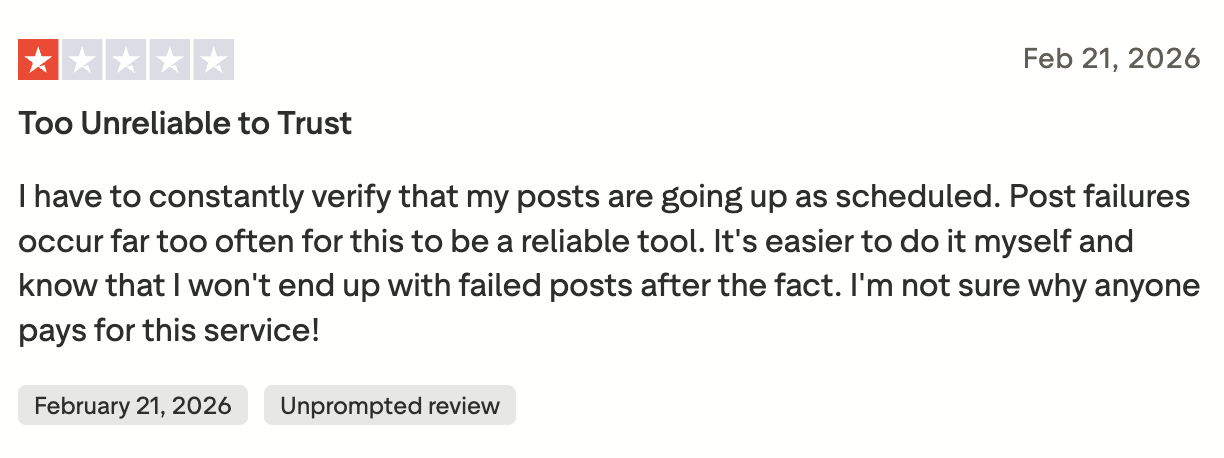
The complaint someone writes in a review is usually the last straw. If you want to name the real reasons, there are four:
1. Per-channel pricing that punishes the growth you wanted
Connect LinkedIn, X, Instagram, and Threads for one brand and the bill stacks fast. Run five clients at that size and you’re paying for 20 channels.
2. Reliability that took a real hit in 2024–2025

Go on Reddit and search “Buffer post failed.” Every scheduling tool has this problem to some degree, but Buffer’s reputation got dented hard enough that even loyal users started saying it out loud. Perception moves before software does, and the perception is set.
3. Scheduling is the whole job
Buffer schedules posts. That’s most of the product. Its AI Assistant can help you draft a caption, and the analytics cover the basics. But it won’t turn your blog into ten channel-ready posts or tie them back to real results.
Each of those is a separate tool on most stacks. In 2020 that was fine. Now the tools competing with it draft the channel versions for you, and paying separately for that work is harder to justify.
4. Approvals built for one reviewer
Buffer’s approval flow assumes one person signs off. Agency work usually needs three, because the strategist drafts it, the account manager checks it, and the client has final say.
Once a post has to clear all three, the review moves into Slack and the calendar falls out of sync with what’s approved.
The 7 Best Buffer Alternatives at a Glance
Here’s the quick version. Each tool solves a different problem, so the best Buffer alternative depends on where your current workflow is starting to break.
| Tool | Best For | Pricing Starts At | Free Trial / Free Plan |
| Distribution.ai | Turning long-form content (blogs, podcasts, videos) into a full social calendar in your brand voice | $19/month (Blog agent) | 15-day free trial |
| SocialPilot | Agencies managing multiple clients and social accounts on a budget | $30/month | 14-day free trial |
| Hootsuite | Enterprise teams that need scheduling plus social listening plus analytics in one platform | $99/month | 30-day free trial |
| Sprout Social | Marketing teams that need presentation-ready analytics and ROI reporting for leadership | $199/month | 30-day free trial |
| Vista Social | Growing agencies that want scheduling, unified inbox, and review management under $50/month | $39/month | 14-day free trial |
| SocialBee | Creators and small businesses with a library of evergreen content worth recycling | $29/month | 14-day free trial + 30-day money-back guarantee |
| Metricool | Analytics-first marketers who want cross-channel reporting and ad tracking on a budget | $22/month (Free plan available) | Free plan + paid trial |
If you already know your main pain point, the table should narrow the field fast.
The sections below go deeper into what each tool does better than Buffer, where it falls short, and who I’d actually recommend it to.
The 7 Best Buffer Alternatives (Ranked by the Problem They Solve)
1. Distribution.ai: Best for Repurposing Long-Form Content Into a Full Social Calendar

Source: Distribution.ai
Over the last decade, I’ve helped brands get more value from content they’ve already published.
I’ve built distribution systems for B2B teams, written a book on the subject, and spent years running the same workflow on my own blog, podcast, and YouTube channel.
Turning one asset into a LinkedIn post, a Threads post, a tweet, and a newsletter takes hours, and those hours are the first to disappear in a busy week.
I said this to HubSpot earlier this year.

Distribution.ai was built to close that gap. You plug in a blog, podcast, or YouTube video. It reads the source, pulls out the ideas worth sharing, and drafts posts for each channel in your voice. Video can also become short-form clips. From there, you can schedule everything and track performance from one dashboard.
It’s my content repurposing framework as a piece of software. Buffer takes over once the posts exist, and Distribution.ai covers the step before that.
Best for: Teams publishing blogs, podcasts, or videos regularly and wanting to get more social content from each one without rebuilding every post by hand.
What works: You can take one source asset and create posts for multiple channels, adapt the writing for each platform, schedule the output, and track performance from one workflow. It covers the publishing job Buffer handles while removing much of the repurposing work you would otherwise do before opening your scheduler.
Recent releases have expanded that workflow further. Instagram Reels publishing now sits alongside YouTube Shorts, so long-form video can become short vertical clips for both platforms. We also shipped AI Chat for editing individual parts of a draft and Style Preferences for adding custom writing rules and reference files.
Where it falls short: If you already write every social post yourself and mainly need a clean calendar to queue them up, Buffer is the simpler tool. Distribution.ai is worth the money when repurposing is part of the job.
Pricing
- Starts at $19/month for the Blog agent, or $29/month for YouTube or Podcast.
- Bundle all three and you save up to 30%, starting at $53.90/month on the Creator tier.
- Organization Pro runs $91.58/month billed annually with five team members included.
I built Distribution.ai, so weigh my recommendation accordingly. The easiest way to judge it is to take the free trial, feed it something you’ve already published, and compare the output against whatever you’re doing today. 15 days, no credit card.
2. SocialPilot: Best for Agencies Managing Lots of Client Accounts

Source: SocialPilot
SocialPilot prices by account rather than by channel, so a single plan covers a set number of social accounts and users no matter how many platforms sit under each brand.
That’s what makes it work for agencies running several clients at once.
The rest is agency plumbing. Clients can be brought into the approval process, team members get scoped access, and reports go out white-labeled from the same platform.
Best for: Agencies and consultants managing multiple brands or client accounts.
What works: SocialPilot gives you more room to manage accounts and clients without paying separately for every channel. The higher plans also include client approvals, team access, advanced analytics, and white-label reporting, which makes it easier to keep client work in one place.
Where it falls short: SocialPilot is still mainly a social media management and scheduling tool. If your bigger problem is turning a blog, podcast, or video into platform-specific posts before they reach the calendar, you’ll still need a separate repurposing workflow.
Pricing
- Essentials starts at $20/month, or $17/month billed annually, for 5 social accounts and 1 user.
- Standard starts at $40/month, or $34/month billed annually, for 10 social accounts and 3 users.
- Premium starts at $100/month, or $85/month billed annually, for 20 social accounts and 6 users.
- Paid plans include a 14-day free trial.
3. Hootsuite: Best for Larger Teams That Need More Than Scheduling

Source: Hootsuite
When I tried Hootsuite for the first time, I was impressed by how much social workflow it tries to pull into one place.
You can publish, manage incoming messages, track performance, monitor conversations, and connect a pretty wide range of tools around the account. Hootsuite now supports more than 100 integrations, so it is clearly built for teams running a broad social operation.
Compared with Buffer, Hootsuite gives you more depth once your team starts handling engagement, social listening, customer care, and reporting alongside publishing.
Best for: Larger marketing teams and enterprise brands managing publishing, engagement, reporting, and social listening from one platform.
What works: I like the breadth. You can schedule content, respond to messages, monitor conversations, review analytics, and plug other parts of your marketing stack into the same dashboard. If several people are working in your social accounts every day, there is real value in keeping those workflows close together.
Where it falls short: Hootsuite can feel like a lot of product if your needs are simple. If you mainly want to queue posts across a few channels, Buffer is easier to learn and easier to justify. Hootsuite makes more sense when the extra workflows are things your team will actually use.
Pricing
- Starts at $99/month.
- Pricing increases as you add users and more advanced team or enterprise features.
- A 30-day free trial is available.
4. Sprout Social: Best for Teams That Need Strong Reporting and Social Operations

Source: Sprout Social
Sprout Social is built for teams that have to prove the value of social to people outside the social team. Scheduling, engagement, approvals, and multi-user access are all there, but the reporting is the reason to pay for it.
You get a much deeper view of what happened after the post went live. You can compare performance across networks, dig into post-level data, and see paid and organic side by side. Then the numbers package into reports you can put in front of leadership without rebuilding them in a spreadsheet.
Buffer is cleaner if you mostly care about getting posts out. Sprout is better suited to teams where social performance has to be reviewed, presented, and defended every month.
Best for: Marketing teams that need deeper analytics, stronger approval workflows, and reports they can actually use in leadership conversations.
What works: I like the reporting depth. You can track performance across channels, compare networks, review competitor data on higher plans, and export reports that are ready to share.
The collaboration side is also stronger once several people are involved. Approvals, permissions, and shared workflows are much easier to manage at scale.
Where it falls short: Sprout is hard to justify unless your team will use the reporting, collaboration, and workflow features regularly.
For a smaller team that mostly needs scheduling and basic analytics, it’s overkill. You’re buying a full social management system whether or not you use it.
Pricing
- Standard starts at $199 per seat/month
- Professional starts at $299 per seat/month
- Advanced starts at $399 per seat/month
- A 30-day free trial is available
5. Vista Social: Best for Agencies That Want More Without Paying Enterprise Prices

Source: Vista Social
I included Vista Social because it gives smaller agencies a lot of the workflow they usually have to pay much more for elsewhere.
You get scheduling, approvals, a unified inbox, reporting, and review management in one platform.
Compared with Buffer, Vista Social gives you more around the publishing workflow. Buffer is easier if all you need is a clean scheduler. Vista Social is stronger once your team is also handling comments, client approvals, reporting, and reputation work.
Best for: Growing agencies and social teams managing several client accounts on a tighter budget.
What works: The amount packed into the price. You can publish, manage engagement, review performance, and handle client work without adding separate tools to the stack.
The unified inbox is especially useful for teams managing comments and messages across multiple brands every day.
Where it falls short: Vista Social can feel like a lot if your workflow is still simple. Solo creators and smaller teams may never touch a good chunk of the platform.
It is also a broader social management tool, so it will not solve the repurposing problem if your team still needs to turn blogs, podcasts, or videos into platform-specific posts before they reach the scheduler.
Pricing
- Plans start at $39/month
- A 14-day free trial is available
6. SocialBee: Best for Creators With Evergreen Content Worth Recycling

Source: SocialBee
If you have posts that still work six months after you publish them, SocialBee lets you organize them into content categories and bring them back into the schedule automatically.
It’s useful once you have a set of proven ideas worth reusing, so you’re not feeding the calendar something new every week.
Buffer can reschedule posts, but SocialBee puts much more emphasis on recycling and maintaining an evergreen library.
Best for: Creators and small businesses with a backlog of social posts worth reusing.
What works: The category system. You can group posts by topic, set how often each category appears, and keep content moving without rebuilding the calendar.
It works especially well if you already know which posts consistently perform and want to get more mileage out of them.
Where it falls short: SocialBee helps you recycle social content, but it still expects you to build that library first.
If your bigger problem is taking a podcast, video, or blog and turning it into the social posts themselves, the tool does less of the heavy lifting before scheduling.
Pricing:
- Plans start at $29/month
- A 14-day free trial is available
- Paid plans also include a 30-day money-back guarantee
7. Metricool: Best for Marketers Who Care More About Analytics Than Publishing

Source: Metricool
Metricool tracks your competitors’ accounts alongside your own. You can see what rival brands are publishing, how it’s performing, and pull that next to your own channel and ad numbers in one report instead of living inside native dashboards all week.
The historical data on paid plans is worth having too. Free analytics tiers usually cap you at a few weeks of history, which hides anything seasonal.
Best for: Marketers and social teams who want strong analytics and competitor data without enterprise pricing.
What works: Cross-channel reporting, competitor tracking, paid campaign monitoring, and exports from one place. The depth is unusual at this price point.
Where it falls short: The free plan drops LinkedIn and X, usually the two networks people want most. Metricool reads performance well and does less to help you produce the posts.
Pricing:
- Free plan available for 1 brand
- Starter starts at $20/month for up to 5 brands
- Advanced starts at $53/month for up to 15 brands
Also Read: 8 Later Alternatives to Elevate Social Media Management in 2026
The Real Question Is What You’ve Outgrown
Every tool on this list solves a different piece of the workflow. The right one depends on which piece is breaking for you.
Here’s how I’d sort them.
Client management is the bottleneck. SocialPilot and Vista Social. Both handle multiple brands, approvals, and client reporting without the enterprise price tag.
Reporting is the bottleneck. Sprout Social and Metricool. Both give you enough depth to let performance data shape what you publish next.
Team scale is the bottleneck. Hootsuite. Publishing, engagement, listening, and reporting in one system.
Evergreen content is the bottleneck. SocialBee. Keeps your best posts in rotation so you’re not rebuilding the calendar every week.
The work before scheduling is the bottleneck. Distribution.ai. Built for teams still spending hours turning blogs, podcasts, and videos into the posts that eventually reach the scheduler.
This part of the workflow has been an obsession of mine for years, because one strong idea kept in motion will reach more people than five new ones nobody sees.
It’s the thinking behind the Distribution Flywheel below.

A good distribution system keeps the work moving from creation to reach, then back into learning and improvement.
The tool you pick should strengthen the part of that loop where your team is losing the most time.
Try Distribution.ai free for 15 days. No card, no catch. Point it at a piece of content you already published and see what it can do with it.
Frequently Asked Questions
1. Which Buffer alternative is actually free?
Most of the tools on this list run a free trial (usually 14 to 30 days), but only one offers a real free plan. Metricool has a genuine free tier for solo users with basic scheduling and analytics.
Distribution.ai runs a 15-day free trial across every plan with no credit card required, which is the closest thing to free while you actually test whether it fits your workflow. Everything else is trial-only.
2. Which Buffer alternative is best for small agencies managing multiple clients?
If budget is the biggest constraint, SocialPilot is the switch that pays for itself in month one because pricing scales per account, not per channel.
If you also need review management for local business clients (Google, Yelp, Tripadvisor), Vista Social is the pick under $50/month. Both handle client approvals, white-label reports, and multi-brand workflows without enterprise pricing.
3. Which Buffer alternative goes deepest on analytics?
Sprout Social if presentation-ready reporting matters (the reports look good in front of a CMO or client), and Metricool if you want cross-channel analytics plus ad tracking at a lower price point.
Distribution.ai covers the numbers you need to make content decisions (impressions, engagement rate, top-performing posts) but it isn’t built to replace a dedicated analytics platform. Pick based on how deep the reporting rabbit hole actually needs to go.
4. What is the best Buffer alternative for solo creators?
Depends on the content you’re making. If you’re posting short-form social from prompts, most tools on this list work. If you’re producing a podcast, a YouTube channel, or a newsletter and want to turn each episode into a week of social posts automatically, that’s what I built Distribution.ai for.
SocialBee is the pick if you’re mostly recycling evergreen posts. Vista Social works if you want scheduling plus review management without enterprise pricing.
5. Is it worth switching from Buffer to something more expensive?
Only if scheduling is no longer the hardest part of your workflow. If the pain is client management, reporting, listening, or turning long-form content into a week of native social posts, the higher price on a bigger tool pays back in hours saved.
If scheduling is still the whole job you need done, Buffer is fine and paying more doesn’t make it better. The right upgrade is the one that matches the piece of the workflow that’s actually costing you time.